Completed 2024

CountIn — Vision-Based Occupancy Tracking in the Browser

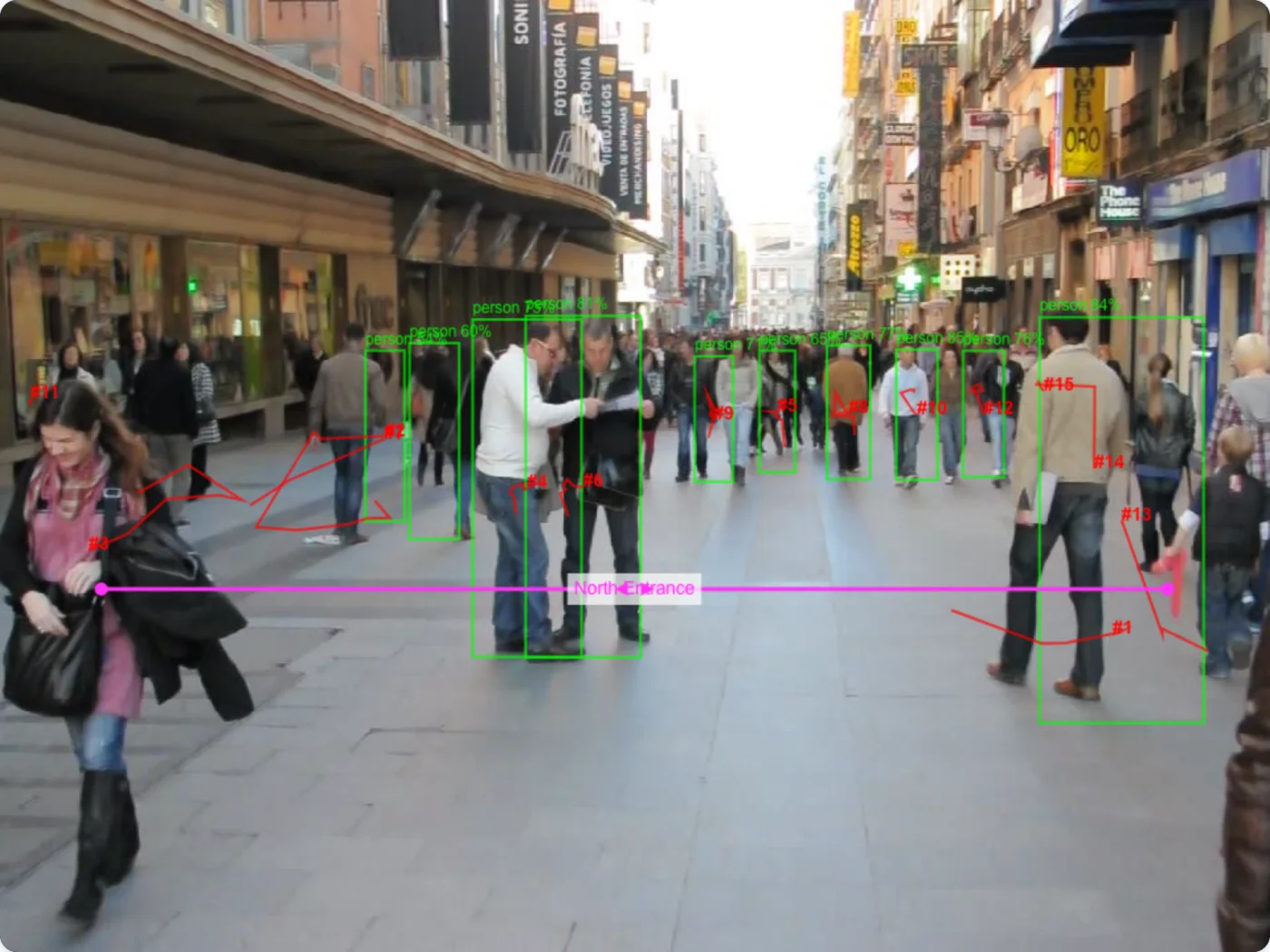
A browser-based computer vision system that counts people in real time. TensorFlow.js does detection; a from-scratch tracker and geometric line-crossing logic handle the counting — all on the client, nothing leaves the device.

Year

2024

Stack

TensorFlow.jsComputer VisionCOCO-SSDReal-Time TrackingBrowser ML

Links

CountIn is a browser-based computer vision system that counts people in real time, for occupancy management and crowd analytics. It runs entirely with TensorFlow.js, 100% locally in your browser — no server, complete privacy. Draw virtual counting lines across entrances and exits and it counts every person who crosses them, tracking direction (in versus out).

Why bother

Occupancy counting is usually solved one of two ways: a person with a clicker, or expensive hardware (overhead sensors, dedicated cameras with on-device processing) wired into a backend. The first doesn’t scale; the second costs real money and ships data somewhere.

CountIn is the version where any laptop with a webcam becomes an occupancy counter. The model and the tracking both run in the browser. There’s no install, no cloud bill, no API rate limit, and the camera feed never leaves the machine. That makes it useful for one-off events and safe to point at a room — nothing is being recorded or transmitted.

How it works

The pipeline is four stages, each running client-side:

Webcam → TensorFlow.js detection → custom tracking →
line-crossing detection → counts → dashboard

Detection. A COCO-SSD model loaded through TensorFlow.js identifies people in each frame and returns their bounding boxes. (RF-DETR is available as an alternative detector.) Detection runs on every other frame to keep the UI responsive.

Tracking. There’s no off-the-shelf tracker here — I wrote a centroid-based one. Each detected box becomes a tracked object identified by the center of its box. Between frames, new detections are matched to existing tracks by Euclidean distance, gated by a confidence threshold that filters flickering false positives. Each track keeps a short position history so its trajectory is stable through momentary occlusion, and tracks that disappear for too long are reaped. The output is a set of persistent IDs that survive across frames.

Line crossing. Counting is geometry. The user draws one or more line segments on the canvas; for each track, the system checks whether the segment between its previous and current position intersects a counting line. That intersection test is a cross-product — the same line-segment-intersection trick you’d write for any 2D collision — with a directional sign that resolves whether the crossing is an in or an out. Each line keeps its own in/out tallies.

The dashboard. Counts update in real time, per line, with live occupancy derived from the running in/out difference. There’s a log of crossing events and a historical chart of crowd flow over time. All state lives in memory in the page.

What I like about it

The tracker is hand-built. Reaching for a tracking library would have hidden exactly the parts worth understanding — why centroid matching works, how confidence thresholds clean up noise, how to survive occlusion without losing identity. Writing it from scratch made the whole system debuggable: when counts drifted, I could see precisely which stage was at fault.

Counting as geometry. The line-crossing logic is a few lines of vector math and it’s the cleanest part of the system. No heuristics, no ML for the counting itself — just a cross product with a sign. It’s a good reminder that “AI” projects are often mostly ordinary engineering around a small ML core.

Genuinely zero-server. Privacy isn’t a setting here, it’s structural. The camera permission is the only permission, the model is fetched once and cached, and after the page loads it works offline. Pointing a webcam at a crowd and counting it without anything being uploaded is the whole point.

Real performance work. TensorFlow.js performance varies wildly across hardware and the model can eat 500 MB+ of memory. Processing every other frame, keeping DOM updates minimal, and rendering to canvas instead of the DOM are what make it feel real-time rather than a slideshow.

Stack

  • ML: TensorFlow.js with COCO-SSD (and RF-DETR) for person detection
  • Custom code: centroid-based PersonTracker, geometric LineManager (cross-product intersection)
  • Frontend: vanilla JavaScript (ES6+), HTML5 Canvas, CSS — no framework, no build step
  • Architecture: event-driven and modular; a detection tick fans out to tracking, then to counting, then to the UI

Status

Completed and usable. Production-ready for local use, tested across modern browsers and a range of devices. The live demo is at countin.ignacio.tech — it works best in a recent Chrome, Firefox, Safari, or Edge, with a webcam, decent lighting, and ~4 GB of RAM. Or clone the repo and run it locally; it’s just static HTML, JS, and CSS.