Glosso: what I learned building an app that listens to how you pronounce
How Glosso started, what it tries to solve, what works, what doesn't quite yet, and what having real users, even a few, has taught me.
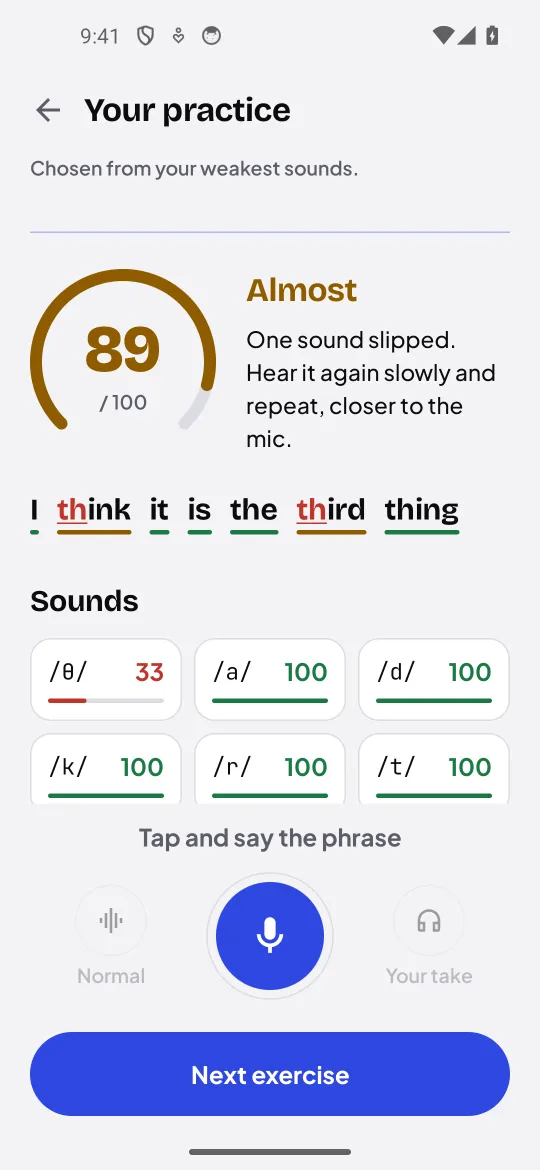
Glosso is an Android app for learning languages that focuses on pronunciation. You record a sentence and, instead of only telling you whether you “got it right”, it tells you which sounds came out well, which one drifted and where the problem is.
It’s published on Google Play. It has about 130 downloads and around 30 monthly users. Those aren’t numbers to brag about, but they are real people using something that started as an experiment of mine, and that changes how you work quite a bit. That’s what this post is about: what Glosso is, why I built it, what works, what doesn’t quite yet, and what I’ve learned along the way.
The problem: understanding is not pronouncing
Almost everyone who studies a language ends up in the same place: they read well, understand a fair amount, and when they speak there’s an accent they don’t know how to fix. Not because they don’t want to, but because they don’t know what they’re doing wrong.
Pronunciation is hard to learn for a few reasons:
- You don’t hear yourself the way others hear you. Your ear is trained on your native language and tends to “correct” what you say so it fits the sounds you already know. If your language doesn’t distinguish two sounds, you probably won’t hear the difference in the other language either.
- The mistake is usually in a single sound. A word can be almost right and still sound off because of one consonant or a vowel that’s too short. Knowing that “something” is wrong doesn’t help much if you don’t know what.
- Human feedback is expensive. A teacher who listens and says “your /θ/ comes out as /t/” is ideal, but not always available, and even less so for ten minutes of practice a day.
Why playing audio or checking words wasn’t enough
Many language apps handle pronunciation in one of two ways. Either they play audio for you to repeat, without listening to you, or they run your voice through a speech recogniser and check whether the words match what was expected.
The second one looks like it measures pronunciation, but it actually measures something else: whether a machine understood the word. And speech recognisers are built precisely to understand you even when you mispronounce. If you say “tink” instead of “think”, it will most likely accept it, because from context the word is obvious. For dictating a message that’s a feature. For learning to pronounce it’s exactly the opposite of what you need.
What I wanted was different: compare what you say with what was expected sound by sound, and give you something useful back: this sound was right, this one close, this one not, and which one it should have been.
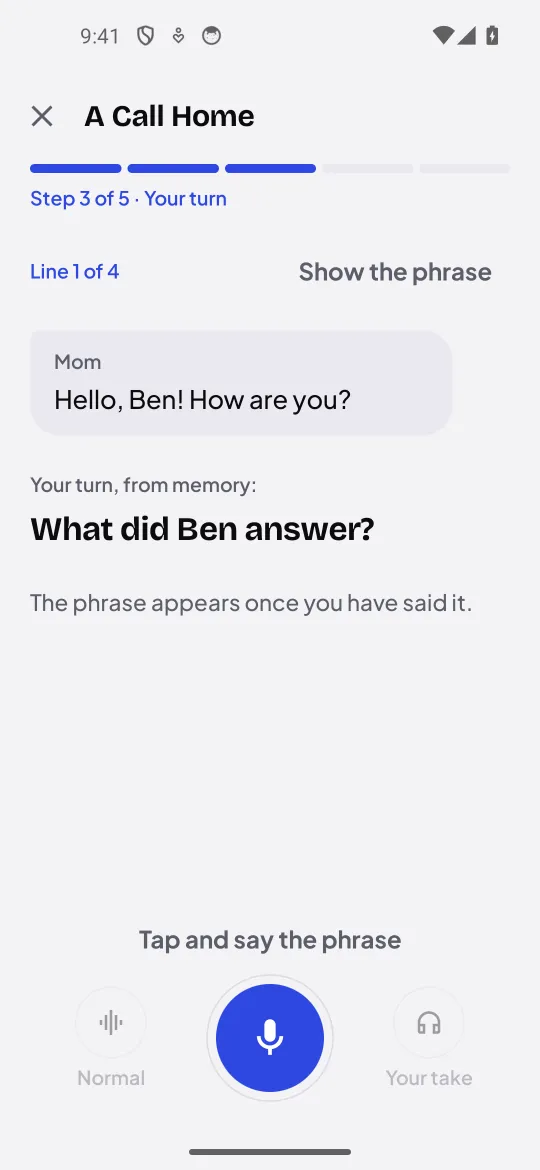
How it works, without the details
Broadly, the process has three parts:
- What was expected. For each sentence, Glosso knows which sounds it should contain, in phonetic notation.
- What was heard. An acoustic speech recognition model analyses your recording, not to get words out of it, but the sounds you actually produced.
- The comparison. The engine aligns both sequences and decides, for each sound, whether it was right, close or missed. From that it builds the result you see: the sentence score, the marked words and the score for each sound.
There’s a lot more work inside each step, and that’s exactly the part I won’t go into here, because it’s where most of the project’s effort lives. What I can share is a design decision I think matters: if the recording can’t be judged (silence, lots of noise, volume too low), Glosso tells you it couldn’t evaluate it, instead of giving you a zero. A zero because of a bad microphone teaches you something false about your pronunciation.
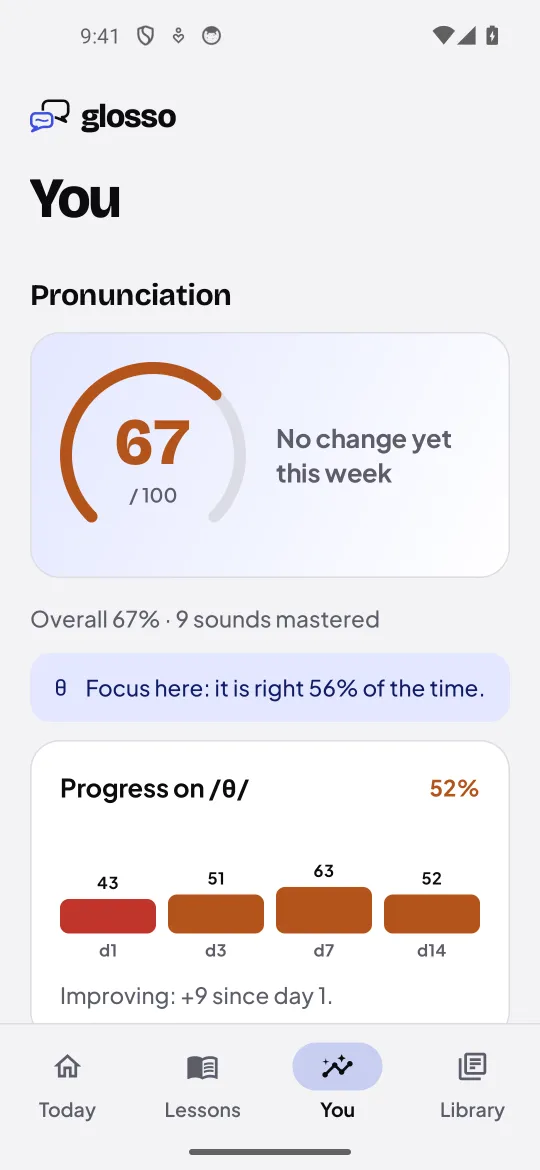
And another one: the score isn’t the point. What I want you to take from each attempt is which sound is off and in which word. Over time, the app tracks those sounds, suggests practice with the ones you struggle with most and shows you whether they improve.
Privacy: where your voice is processed
I want to be precise here, because it’s easy to say “privacy” and leave it at that.
- By default, scoring happens on my server. The recording travels over HTTPS, is scored in memory and discarded as soon as the request finishes. It isn’t stored, sold or used to train models.
- If you’d rather your voice never left the phone, Settings lets you download a model that does the scoring on the phone itself. It’s a big download, about 342 MB, but from then on it works offline. The engine running on the phone is the same one running on the server, so the score should be the same either way.
- There are no ads and no third-party tracking SDKs, and you don’t need an account to use the app. Your progress stays on the device.
- There are first-party usage statistics. The app sends usage events to my server (which screens are opened, whether a lesson is finished, whether something fails), linked to a random installation id, not to your name or email. They’re on by default, the app says so when you start, and you can turn them off and delete them from Settings.
I mention that last one because it’s the honest thing to do: when you have 30 users, knowing whether someone finishes a lesson or leaves halfway is the only way to find out something isn’t working. But I made myself keep it first-party, minimal, and explained in the privacy policy.
What I’ve learned building and publishing Glosso
Glosso started as a personal prototype: I wanted to know whether pronunciation could be measured in a more useful way than “right” or “wrong”. From there it became an app, and from there a published app. Each of those steps taught me different things.
Working on your machine means nothing. The engine gave me good results with my own recordings long before it did with other people’s. Different microphones, background noise, people who speak softly or leave a long silence before starting: each of those cases broke something.
Measure with a single yardstick. For a while I had several ways of measuring whether the engine was improving, and each told a different story. In the end I kept a single benchmark with a simple criterion: a native speaker should get a very high score. They still don’t always, and it’s one of the open problems. I’d rather know that with a reproducible number than trust an impression.
Publishing is a separate job. Putting an app on Google Play isn’t just building it. There’s a privacy policy, the data safety form, screenshots, text in several languages, reviews… and all of it has to be consistent. For example, one text in the app described the statistics as “anonymous” when they’re actually linked to a random id; that’s pseudonymous, not anonymous. I fixed it before that version shipped, but it taught me that every sentence you write about privacy is a promise.
Visual details matter more than I thought. A screen that looks fine on the emulator can get cut off on a user’s phone. Now I always test at the same screen density as a real phone and compare screenshots before calling anything done.
Having real users, even a few
30 users a month isn’t much. But they’re 30 people who decided to spend a few minutes of their day on something I made, and that weighs on you.
It changes how you work. Before, I could break things without consequences; now a change in how data is stored has to keep the progress of someone who’s been practising for weeks. Before, I could change the score from one day to the next; now, if scoring moves, someone who got 80 yesterday gets 70 today without doing anything differently, and that’s unfair.
It also keeps you grounded. With few users, there’s no statistic good enough for anything subtle. What you do see clearly are the big failures: a lesson almost nobody finishes, a screen where people get stuck, an error that keeps coming back.
Why it’s time to maintain, not add
For months the project grew by adding features: lessons, dialogues, stories, exercises, a sound profile, offline downloads, more interface languages. At some point adding things became easier than making the existing ones work really well.
Glosso is now in a stable phase, and that’s deliberate: I’m not going to keep adding features for the sake of it. The work focuses on two things:
- Improving the pronunciation engine, which is the heart of the product. Fairer scores, fewer mistakes with native speakers and clearer feedback.
- Adding languages. I started with English, with a British accent reference and later an American one too, and there’s already a beginner Russian course. Each new language isn’t just translation: it needs its content, its reference audio and a description of its sounds.
What I keep doing is fixing what I find, and making sure each new version is at least as good as the last one.
Where it could go
I don’t want to promise dates, but I can share the direction:
- More languages, one at a time and done properly, rather than many done halfway.
- A better engine, always measured with the same benchmark, so every improvement is a real one and not an impression.
- A lighter offline option, so more people can score on their own phone without downloading hundreds of megabytes.
Glosso started with a simple question: can you help someone pronounce better by telling them exactly which sound is off? After building it, publishing it and seeing real people use it, my answer is yes, with caveats. It works better than I expected in some things and worse in others, and most of the work left is in those caveats.
If you want to try it, it’s at glossostudio.com. And if you try it and something doesn’t convince you, I’d really like to hear about it.
Drafted with AI, edited by hand. I publish it when it sounds like me.